

Shorten parts parametrically in FreeCAD

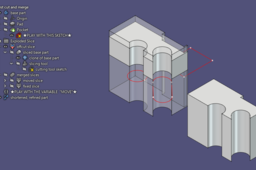
I needed to shorten a part by 0.1mm. A quick and dirty approach would have gotten the job done, but what if there were more changes upstream? I came up with a workflow to remove material from the "middle" of a part while still being able to make upstream changes that trickle down to the shortened part.
Sound confusing? It's not.
Play around with the project file and you will see how to replicate this workflow.
-
Step 1: Open the project file
It's in my models library under the title "Shorten parts parametrically in FreeCAD". The .FCStd file.
-
Step 2: Change how much material to remove
Play with the "move" variable in the VarSet.
-
Step 3: Play with the base geometry
Play around with the starred sketch and see how your shortened part updates along with the original part.

