Learn about the GrabCAD Platform
Get to know GrabCAD as an open software platform for Additive Manufacturing
Visit our new homepage
Home
Control
Shop
Streamline Pro
Partner Program
Print
Community
Log in
Library
Challenges
Groups
Questions
Tutorials
Engineers
Blog
Log in
Learn from thousands of free Tutorials.
New user?
Join the community
or
log in.
Tutorials
Most liked all time
Recent
Most liked
Most viewed
Most commented
This week
This month
All time
Category
Design & CAD
Modeling
Drafting
Assemblies
BOM
Dimensioning / Tolerancing
Translations
Manufacturing & CAM
3D Printing
Tooling
NC Machining
Composites
Measurement / Inspection
Simulation & CAE
FEM
CFD
Kinematics
Process Simulation
Engineering Fundamentals
Theory
Process
Standards
Other
Software
Snagit
Alibre Design
ArchiCAD
AutoCAD
AutoCAD Electrical
Autodesk 3ds Max
Autodesk Alias
Autodesk Inventor
Autodesk Maya
Autodesk Revit
Autodesk 123D
BricsCAD
Bentley MicroStation
BlenderCAD
BobCAD-CAM
CATIA
Delmia
DraftSight
FreeCAD
Femap
Fusion 360
Geomagic Design
IronCAD
JT
Kompas-3D
KeyCreator
KeyShot
Lagoa
Luxology
Mastercam
Moi3D
NX Unigraphics
OBJ
Onshape
OpenSCAD
Parasolid
Powermill
Powershape
Pro/Engineer Wildfire
PTC Creo Parametric
PTC Creo Elements
Rhino
SpaceClaim
SOLIDWORKS
solidThinking Evolve
Solid Edge
SolidFace
STEP / IGES
SketchUp
STL
TopSolid
TinkerCAD
T-Flex CAD
TurboCAD
VectorWorks
ViaCAD 3D
VRML / WRL
ZW3D
GrabCAD Print
Rendering
GrabCAD Community
GrabCAD Workbench
Text file
3D Manufacturing Format
Cinema 4D
Other
Beginner
All levels
Beginner
Intermediate
Expert
excel
×
Designing a Hirth Spline
Tjerk de Graaff
in
Theory
28
10
Beginner
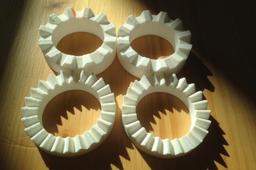
Solidworks + Excel instruction on how to design a Hirth Spline. Background on Hirth Splines: https://en.wikipedia.org/wiki/Hirth_joint The basic idea of a Hirth spline / Hirth Joint is that the whole geometry is defined from a combination of a single reference point and a grinding/cutting geometry. Two Hirth splines with the same basic tooth geometry will match to form a secure joint that can transfer torque and allows for accurate alignment of parts. Hirth splines and joints are often used in turbomachinery to accurately align various shaft parts and transfer torque.
design
excel
solidworks
transfer
torque
joint
spine
hirth
FreeCAD parametric 3d drawing
Christie S
in
Modeling
10
0
Beginner
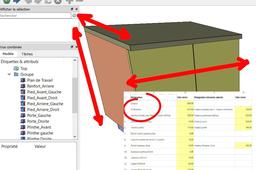
3D drawing driven by a data sheet. Example : creating a kitchen cabinet furniture driven by a Spreadsheet.
FreeCAD
data
sheet
excel
freecad
Tutorial - How to drive a Solid Edge model from Excel
Grant Holohan
in
Design & CAD
8
2
Beginner
Here's how...
Solid Edge
table
link
part
variable
solid
edge
synchronous
tutorial
excel
variables
Solidworks Design Table Formulas
Interactive CAD & Tech (Chris)
in
Modeling
5
0
Beginner
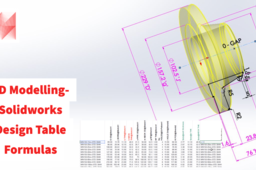
This is a video tutorial of how to model and use Formulas in Design Tables Design Table Basics Video Tutorial https://www.youtube.com/watch?v=pk74gWNCbQw&t=0s
SOLIDWORKS
excel
formulas
tables
design
solidworks
How to import points from MS Excel in NX?
Hegedűs György
in
Design & CAD
3
4
Beginner
Use these scripts to import 3D coordinates from MS Excel file into NX model (unfortunately sample script and files attachments not allowed).
NX Unigraphics
excel
nx
import
journal
FreeCAD Spreadsheets - The Basics
Sar Dar
in
Design & CAD
3
0
Beginner
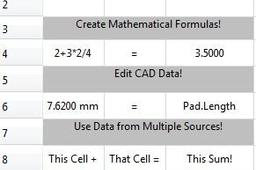
An introduction to using FreeCAD spreadsheets.
FreeCAD
formula
bom
math
csv
excel
chart
table
spreadsheet
Create a Product Table - CATIA R19x
Maxime Chagnot
in
Modeling
1
0
Beginner
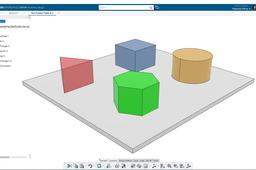
Hello everyone, In this new tutorial you will learn, how to create a product table in an assembly. It allows you to create different configuration in a product. You will have access to an Excel sheet and decide for each configuration to keep a part (as "true) and remove a part (as "false"). Hope you will enjoy the video! Find the models on these Grabcad links: - https://grabcad.com/library/room-with-3-configuration-1 - https://grabcad.com/library/plate-with-configurations-1 Please Like, Comment, Share and Subscribe :D
CATIA
assembly
excel
configuration
table
product
3dexperience
catia
Why is thickness not updating in a Sheet Metal reducer part?
Dan Novak
in
Design & CAD
0
0
Beginner
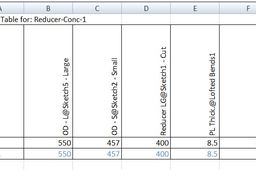
I'm not sure if this is the "correct" answer, but I got it to work by adding Thickness@Sheet-Metal1 to the table and changing it along with PL Thick.@Lofted Bends1. See screen caps.
SOLIDWORKS
sheetmetal
excel
thickness