Learn about the GrabCAD Platform
Get to know GrabCAD as an open software platform for Additive Manufacturing
Visit our new homepage
Home
Control
Shop
Streamline Pro
Partner Program
Print
Community
Log in
Library
Challenges
Groups
Questions
Tutorials
Engineers
Blog
Log in
Learn from thousands of free Tutorials.
New user?
Join the community
or
log in.
Tutorials
Most liked all time
Recent
Most liked
Most viewed
Most commented
This week
This month
All time
Category
Design & CAD
Modeling
Drafting
Assemblies
BOM
Dimensioning / Tolerancing
Translations
Manufacturing & CAM
3D Printing
Tooling
NC Machining
Composites
Measurement / Inspection
Simulation & CAE
FEM
CFD
Kinematics
Process Simulation
Engineering Fundamentals
Theory
Process
Standards
Other
Software
Snagit
Alibre Design
ArchiCAD
AutoCAD
AutoCAD Electrical
Autodesk 3ds Max
Autodesk Alias
Autodesk Inventor
Autodesk Maya
Autodesk Revit
Autodesk 123D
BricsCAD
Bentley MicroStation
BlenderCAD
BobCAD-CAM
CATIA
Delmia
DraftSight
FreeCAD
Femap
Fusion 360
Geomagic Design
IronCAD
JT
Kompas-3D
KeyCreator
KeyShot
Lagoa
Luxology
Mastercam
Moi3D
NX Unigraphics
OBJ
Onshape
OpenSCAD
Parasolid
Powermill
Powershape
Pro/Engineer Wildfire
PTC Creo Parametric
PTC Creo Elements
Rhino
SpaceClaim
SOLIDWORKS
solidThinking Evolve
Solid Edge
SolidFace
STEP / IGES
SketchUp
STL
TopSolid
TinkerCAD
T-Flex CAD
TurboCAD
VectorWorks
ViaCAD 3D
VRML / WRL
ZW3D
GrabCAD Print
Rendering
GrabCAD Community
GrabCAD Workbench
Text file
3D Manufacturing Format
Cinema 4D
Other
Skill level
All levels
Beginner
Intermediate
Expert
Drafting
×
Simulation & CAE
×
Process Simulation
×
Process
×
Other
×
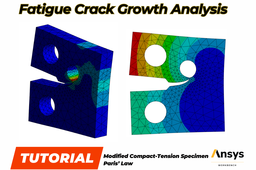
Fatigue Crack Growth Analysis of Modified Compact-Tension Specimen - ANSYS Workbench
Semih Tinmaz
in
FEM
84
15
Intermediate
This tutorial includes step-by-step fatigue crack analysis of Modified Compact-Tension Specimen.
spaceclaim
computer aided engineering
finite element analysis
fracture mechanics
paris law
ansys workbench
fatigue crack
fatigue life
Ejercicio SMM - Parte 1
Marcelo Valderrey
in
Other
78
0
Beginner
Bajar un modelo de parte en formato STEP, importarlo, repararlo y guardarlo como parte de SolidWorks.
SOLIDWORKS
unr
smm
Ejercicio SMM - Parte 5
Marcelo Valderrey
in
Other
77
0
Beginner
Recursos visuales orientados a la creación de presentaciones a partir de imágenes, animaciones y videos.
unr
smm
Ejercicio SMM - Parte 4
Marcelo Valderrey
in
Other
76
0
Beginner
Exportar un ensamblaje en formato STEP. Abrir ensamblajes en modo LARGE DESIGN REVIEW. Convertir ensamblajes con MAKE VIRTUAL.
unr
smm
Ejercicio SMM - Parte 8
Marcelo Valderrey
in
Other
75
0
Beginner
SolidWORKS Motion - Animación
unr
smm
Ejercicio SMM - Parte 3
Marcelo Valderrey
in
Other
75
0
Beginner
Crear un ensamblaje a partir de distintas configuraciones de una misma pieza.
unr
smm
Ejercicio SMM - Parte 6
Marcelo Valderrey
in
Other
74
0
Beginner
Continuando con los recursos visuales orientados a la creación de presentaciones, veremos elementos básicos para crear imágenes renderizadas.
unr
smm
Ejercicio SMM - Parte 9
Marcelo Valderrey
in
Other
74
0
Beginner
SolidWORKS Motion - Movimiento básico
unr
smm
Ejercicio SMM - Parte 2
Marcelo Valderrey
in
Other
74
0
Beginner
Generar configuraciones dentro del archivo de parte eliminando selectivamente sus sólidos.
unr
smm
Ejercicio SMM - Parte 7
Marcelo Valderrey
in
Other
74
0
Beginner
Vistas en sección, en explosión y algunas animaciones automáticas.
unr
smm
Cap screws and machine screws
dea
in
Drafting
69
12
Intermediate
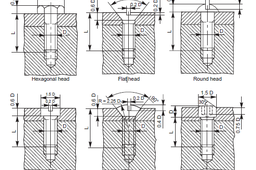
Cap screws and machine screws are similar in shape, differing only in their relative sizes. Machine screws are usually smaller in size, compared to cap screws. These are used for fastening two parts, one with clearance hole and the other with tapped hole. The clearance of the unthreaded hole need not be shown on the drawing as its presence is obvious. Figure 5.24 shows different types of cap and machine screws, with proportions marked Cap screws are produced in finish form and are used on machines where accuracy and appearance are important. As cap screws are inferior to studs, they are used only on machines requiring few adjustments and are not suitable where frequent removal is necessary. These are produced in different diameters, upto a maximum of 100 mm and lengths 250 mm. Machine screws are produced with a naturally bright finish and are not heat treated. They are particularly adopted for screwing into thin materials and the smaller ones are threaded throughout the length. They are used in fire-arms, jigs, fixture and dies. They are produced in different diameters upto a maximum of 20 mm and lengths upto 50 mm.
Autodesk Inventor
screw
cap
Spur Gear Set - Stress Evaluation
Semih Tinmaz
in
FEM
58
0
Beginner
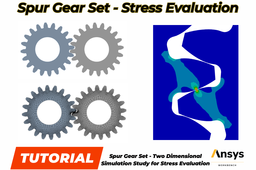
Spur gears have their teeth cut parallel to the axis of the shaft on which the gears are mounted, transmitting power between the parallel shafts. To maintain a constant angular velocity ratio, two meshing gears must satisfy a fundamental law of gearing: the shape of the teeth must be such that the common normal at the point of contact between two teeth must always pass through a fixed point on the line of centers. The contact point is called the pitch point. The goal is to assess the maximum stress during the transmission of the torque. By engineering judgement, the maximum stress occurs either at a contact point or at the root of a tooth due to the bending of the tooth. Since there is no restriction of deformation in the depth direction, i.e.,the gears are free to expand (or contract) in the depth direction, so it is modeled as a plane stress problem.
ansys workbench
stress analysis
transmission
gears
gear
finite element analysis
Side Pole Test - High Speed Impact - Explicit Dynamics - ANSYS Workbench
Semih Tinmaz
in
FEM
54
0
Intermediate
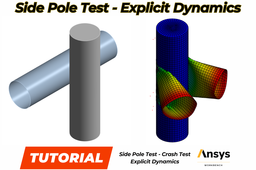
Explicit dynamics is a time integration method used to perform dynamic simulations when speed is important. Explicit dynamics account for quickly changing conditions or discontinuous events, such as free falls, high-speed impacts, and applied loads. Because these “nonlinear dynamics” are integrated into the simulation, explicit dynamics is the preferred choice for simulating highly transient physical phenomena. Some side impacts involve a vehicle travelling sideways into rigid roadside objects such as trees or poles. Often this is the result of a loss of control on the part of the driver, owing to speeding, misjudgement of a corner or because of a skid in slippery conditions.
high-speed impact
impact
finite element analysis
explicit dynamics
ansys workbench
side pole test
crash test
Topology Optimization of Triangular Bracket - ANSYS Workbench
Semih Tinmaz
in
FEM
53
2
Intermediate
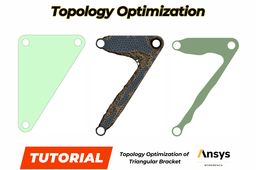
Topology optimization is a mathematical method which spatially optimizes the distribution of material within a defined domain, by fulfilling given constraints previously established and minimizing a predefined cost function. Main aim of this tutorial is optimizing and decreasing the material density of the triangular bracket as 50% by topology optimization.
ansys workbench
ansys
spaceclaim
topology optimization
topology
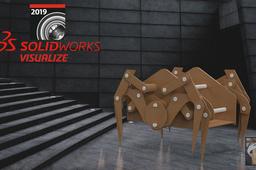
SOLIDWORKS Visualize 2019 Tutorial - How to Render A Spider Robot Motion Study as Realistic.
Ahmed ElPrince
in
Other
50
1
Expert
This Video Below Will Help You as a Beginner to know the Basics of Rendering Any Motion Study from SOLIDWORKS Software, Also Some Tricks inside Visualize will be explained after watching This VIDEO. If You Understand and Learnt Something New ... Please Like And Subscribe My New Channel (Prince EnGineer).. if You have any Question I'll Reply and Thanks For Watching Link: https://www.youtube.com/watch?v=PNJmwm6g1cA&t=123s
3d
animation
video
visualize
solidworks
render
robot
spider
1
2
3
…
100